
.png)
Forms
Application for A Communication Device (Fillable PDF / Electronic Version)
This will allow you to download a fillable pdf which you can then
submit to applications@oarc.ca or fax to (204) 775-2385.
Applications are accepted between September 1st and March 31st each year.
submit to applications@oarc.ca or fax to (204) 775-2385.
Applications are accepted between September 1st and March 31st each year.

*Accompanying information for applications eligible for NIHB funding*
AAC Equipment is now eligible for funding through the Non-Insurance Health Benefits if the child is eligible. To be eligible, a client must be a resident of Canada, and one of the following: a First Nations person who is registered under the Indian Act (commonly referred to as a "Status Indian") an Inuk recognized by an Inuit land claim organization as outlined in Inuit client eligibility for the NIHB program, child less than 2 years old whose parent is an NIHB-eligible client
Short Term Equipment Trial
Use this form if borrowing a short term loan from OARC to answer questions you might have about the best AAC system for an individual.
Application for Eye Gaze communication system
Application forms for Eye Gaze Communication Systems will be provided following a consultation with OARC staff to determine if eye gaze is an appropriate access method. Please read through our eye-gaze process and forward completed Eye Gaze Consultation Forms to mary-alex@oarc.ca to get started!
Request for a Keyguard
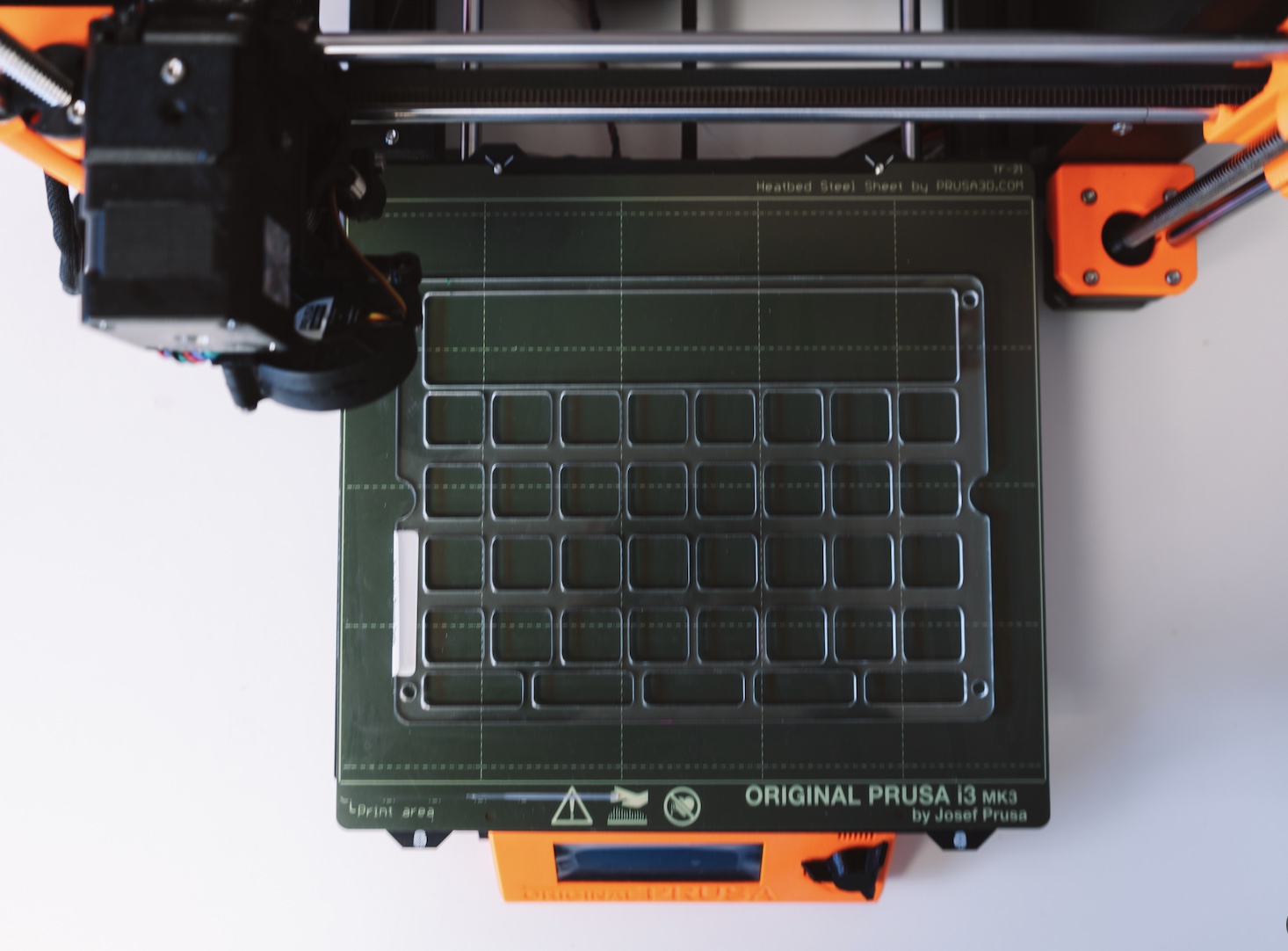
Keyguards can help individuals with motor or vision difficulties. They sit on top of the iPad screen and are customized for the number of buttons on your AAC user's communication app. A keyguard helps guide their touch by creating a barrier between buttons. Thanks to a partnership with Makers Making Change we are able to print these accessories in-house for $25.
Important Note:
OARC may place a communication device application on inactive status when progress on the application cannot continue due to circumstances beyond OARC's control. This may include:
- Repeated unsuccessful attempts to contact the clinician, family, caregiver, or other service providers involved in the application process.
- Lack of response or required information from the referring clinician or other professionals necessary to support the application.
- Extended delays or lack of response from the funding source that prevent further action on the application.Prior to moving an application to inactive status,
OARC will make reasonable efforts to obtain the information or contact required parties. Applications may be reactivated if communication is re-established and the information needed to proceed becomes available.
OARC may place a communication device application on inactive status when progress on the application cannot continue due to circumstances beyond OARC's control. This may include:
- Repeated unsuccessful attempts to contact the clinician, family, caregiver, or other service providers involved in the application process.
- Lack of response or required information from the referring clinician or other professionals necessary to support the application.
- Extended delays or lack of response from the funding source that prevent further action on the application.Prior to moving an application to inactive status,
OARC will make reasonable efforts to obtain the information or contact required parties. Applications may be reactivated if communication is re-established and the information needed to proceed becomes available.

Question: Can OARC set up an iPad that was purchased outside of OARC, and what costs are involved?
Answer: OARC is able to assist with setting up equipment that has been acquired outside of OARC, for a fee. An Application For A Communication Device is still required.
For iPads, we can enroll the device in our remote management system; however, this requires both a $150 setup fee and an $85 software licence for enrollment and ongoing device management. In addition, any communication applications required for the device, such as Proloquo2Go, must be purchased through our Apple Business account to ensure proper licensing and management. Unfortunately, we are unable to use Apple Gift Cards for these purchases. The cost of these applications must be covered by the family/funder.
For a typical iPad setup that includes remote management enrollment, the required software licence, and the Proloquo2Go communication app, the total cost is approximately $625.
Please note that actual costs may vary depending on the specific communication apps and services required.
Answer: OARC is able to assist with setting up equipment that has been acquired outside of OARC, for a fee. An Application For A Communication Device is still required.
For iPads, we can enroll the device in our remote management system; however, this requires both a $150 setup fee and an $85 software licence for enrollment and ongoing device management. In addition, any communication applications required for the device, such as Proloquo2Go, must be purchased through our Apple Business account to ensure proper licensing and management. Unfortunately, we are unable to use Apple Gift Cards for these purchases. The cost of these applications must be covered by the family/funder.
For a typical iPad setup that includes remote management enrollment, the required software licence, and the Proloquo2Go communication app, the total cost is approximately $625.
Please note that actual costs may vary depending on the specific communication apps and services required.
Form Name 1
Lorem Ipsum is simply dummy text of the printing and typesetting industry.
Thank you! Your submission has been received!
Oops! Something went wrong while submitting the form.
Form Name 2
Lorem Ipsum is simply dummy text of the printing and typesetting industry.
Thank you! Your submission has been received!
Oops! Something went wrong while submitting the form.
Form Name 4
Lorem Ipsum is simply dummy text of the printing and typesetting industry.
Thank you! Your submission has been received!
Oops! Something went wrong while submitting the form.
Form Name 4
Lorem Ipsum is simply dummy text of the printing and typesetting industry.
Thank you! Your submission has been received!
Oops! Something went wrong while submitting the form.
Form Name 5
Lorem Ipsum is simply dummy text of the printing and typesetting industry.
Thank you! Your submission has been received!
Oops! Something went wrong while submitting the form.


The Open Access Resource Centre (OARC) is dedicated to enriching the lives of Manitobans who have communication difficulties or who are non-speaking by providing access to Augmentative and Alternative Communication (AAC)
The Open Access Resource Centre acknowledges we are located upon Treaty #1 and the homeland of the Red River Metis Nation. We work in partnership with children, families and communities who reside on ancestral lands and traditional territories throughout Manitoba. We thank Mother Earth for life-sustaining waters. We understand all benefit from and take responsibility for these gifts.Open Access Resource Centre is committed to continued reflection and dialogue to ensure a place where everyone’s voice is heard.
Quick Links
Contact Us
OARC © All Right Reserved